<?xml version="1.0" encoding="UTF-8"?>
<?xml-stylesheet href="http://www.measure-control.com/xml/atom.xsl" type="text/xsl" media="screen"?>
<?xml-stylesheet href="http://www.measure-control.com/xml/atom.css" type="text/css" media="screen"?>
<feed xmlns="http://www.w3.org/2005/Atom"  xmlns:media="http://search.yahoo.com/mrss/" xmlns:dc="http://purl.org/dc/elements/1.1/" xmlns:itunes="http://www.itunes.com/dtds/podcast-1.0.dtd" xmlns:geo="http://www.w3.org/2003/01/geo/wgs84_pos#" xmlns:georss="http://www.georss.org/georss" xmlns:photo="http://www.pheed.com/pheed/">
 <title>micronext</title>
 <subtitle><![CDATA[measure-control, micronext sprl, a public limited company set up in 1982 specializes in the design and manufacture  of measuring and control equipments.]]></subtitle>
 <link rel="alternate" type="text/html" href="http://www.measure-control.com" />
 <link rel="self" type="text/xml" href="http://www.measure-control.com/xml/atom.xml" />
 <id>http://www.measure-control.com/</id>
 <updated>2012-02-23T00:30:53+01:00</updated>
  <entry>
   <title>About us - our address</title>
   <updated>2009-03-11T17:52:00+01:00</updated>
   <id>http://www.measure-control.com/About-us-our-address_a2.html</id>
   <category term="About us" />
   <photo:imgsrc>http://www.measure-control.com/photo/art/imagette/1224760-1594962.jpg</photo:imgsrc>
   <published>2009-02-20T19:43:00+01:00</published>
   <author><name>J D'hoedt</name></author>
   <content type="html">
    <![CDATA[
     <div style="position:relative; text-align : center; padding-bottom: 1em;">
      <img src="http://www.measure-control.com/photo/art/default/1224760-1594962.jpg" alt="About us - our address" title="About us - our address" />
     </div>
     <div>
      SPRL Micronext, a public limited company set up in 1982, specializes in the design and manufacture of measuring and control equipment. It has an in-house design office and a production unit for prototypes and small series production. This flexible structure has allowed a network of partners to be developed, enabling the company to adapt in very short time periods, with a quality standard guaranteed to match its clients’ requests.       <br />
       SPRL Micronext is involved in the automotive sector, with its windscreen wiper control apparatus (load gauge and angle measurement device) and In the process automation field, Micronext carries out design studies and produces tailor-made equipment providing solutions to its customers’ specific problems.       <br />
              <br />
              <br />
       
     </div>
     <br style="clear:both;"/>
    ]]>
   </content>
   <link rel="alternate" href="http://www.measure-control.com/About-us-our-address_a2.html" />
  </entry>
  <entry>
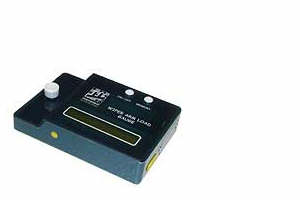
   <title>Dynamometer for wiper arms 00403-M</title>
   <updated>2009-03-11T18:04:00+01:00</updated>
   <id>http://www.measure-control.com/Dynamometer-for-wiper-arms-00403-M_a3.html</id>
   <category term="dynamometer for wiper arms" />
   <photo:imgsrc>http://www.measure-control.com/photo/art/imagette/1225390-1595800.jpg</photo:imgsrc>
   <published>2009-02-19T10:51:00+01:00</published>
   <author><name>J D'hoedt</name></author>
   <content type="html">
    <![CDATA[
wiper arm load gauge 00403-M>description>load measurement>changing the battery>unit choice>language choice     <div style="position:relative; float:right; padding-left: 1ex;">
      <img src="http://www.measure-control.com/photo/art/default/1225390-1595800.jpg" alt="Dynamometer for wiper arms 00403-M" title="Dynamometer for wiper arms 00403-M" />
     </div>
     <div>
      <b><span class="u">Description</span></b>       <br />
              <br />
       - Micro-controller and strain gauge system.       <br />
       - Automatic temperature compensation.       <br />
       - Measure the load up to 20 N.       <br />
       - Three units displayed: kgf , N, oz.       <br />
       - precision: 1% full scale.       <br />
       - LCD 16 characters.       <br />
       - Automatic zero search on starting up       <br />
       - Memorization of the displayed value       <br />
       - 9 V PP3 battery feeding.       <br />
       - Measurement by impulses.       <br />
       - Display refresh: one time per second.       <br />
       - Languages: French, English, Spanish, German, Italian.       <br />
       - Dimensions: 80 x 120x 31 mm       <br />
              <br />
       ________________________________________________________________________________
     </div>
     <br style="clear:both;"/>
     <div>
      <b><span class="u">Load measurement</span></b>       <br />
              <br />
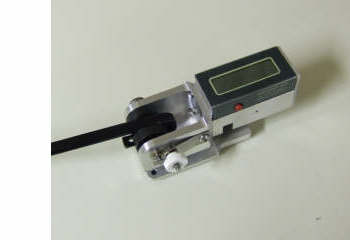
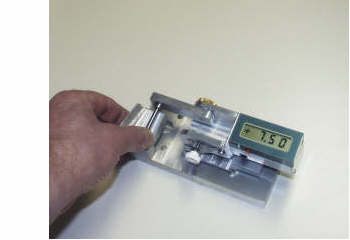
       Put down the device on the windshield in such a way that the extremity of the wiper arm arrives in front of the measure system.       <br />
       Push and release the ON / OFF button without applied effort.       <br />
       Wait for the ZERO SEARCH:OK indication.       <br />
       Apply the extremity of the wiper arm on the measurement system; the display indicates the value and the load unit.       <br />
       When the measure is steady, push on MEMORY button to maintain the display to this value. Clear this value by pushing once again.       <br />
       The device cuts itself automatically after three minutes of inactivity.       <br />
              <br />
              <br />
              <br />
       
     </div>
     <br style="clear:both;"/>
     <div style="position:relative; float:right; padding-left: 1ex;">
      <img src="http://www.measure-control.com/photo/art/default/1225390-1596908.jpg" alt="Dynamometer for wiper arms 00403-M" title="Dynamometer for wiper arms 00403-M" />
     </div>
     <div>
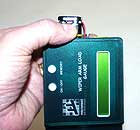
      <b><span class="u">Changing the battery</span></b>       <br />
              <br />
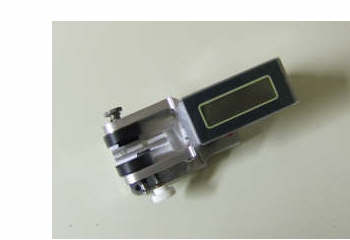
       Unscrew and remove the closing plate.       <br />
       Disconnect battery connector.       <br />
       Take the battery out, change it.       <br />
       Engage the battery ( minus pole to the center ). Set the battery connector.       <br />
       Take the battery in, replace the closing plate and screw back again.
     </div>
     <br style="clear:both;"/>
     <div style="position:relative; float:right; padding-left: 1ex;">
      <img src="http://www.measure-control.com/photo/art/default/1225390-1596913.jpg" alt="Dynamometer for wiper arms 00403-M" title="Dynamometer for wiper arms 00403-M" />
     </div>
     <div>
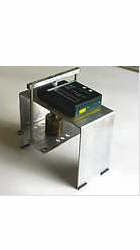
      <b><span class="u">Load calibration</span></b>       <br />
              <br />
       To start the procedure, hold MEMORY down. Push and release ON/OFF. Wait until OK appears. Release MEMORY.       <br />
              <br />
       If the difference between measured value and real value is not important you may use a short calibration procedure. At starting up apply a known charge and verify the indication given by the device. Correct with the gain adjust potentiometer to obtain the exact value and turn the device off. Repeat operation to check.       <br />
              <br />
       Complete calibration:       <br />
       - for a charge of 0 of the displayed value is approximately 35.       <br />
       - for a charge of 1 kgf the displayed value must be: the given value for 0 kgf plus 450, for example 35 + 450 = 485. Adjust the gain potentiometer to perform the condition: displayed value at 0 kgf + 450 = displayed value at 1 kgf.       <br />
       - Redo with 0 kgf and 1 kgf to check the condition. If not, adjust once again.       <br />
              <br />
       To quit push on ON/OFF. To go to UNIT CHOICE push on MEMORY       <br />
              <br />
       
     </div>
     <br style="clear:both;"/>
     <div>
      <b><span class="u">Unit choice</span></b>       <br />
              <br />
       This procedure follows load calibration.       <br />
       To go from an unit to the next push on MEMORY. To choose the unit hold MEMORY down until OK appears. To quit push on ON/OFF. To go to language choice push on MEMORY.
     </div>
     <br style="clear:both;"/>
     <div>
      <b><span class="u">Language choice</span></b>       <br />
              <br />
       This procedure follows UNIT CHOICE.       <br />
              <br />
       To go from an language to the next push on MEMORY. To choose the language hold MEMORY down until OK appears. To quit push on ON/OFF.       <br />
       
     </div>
     <br style="clear:both;"/>
    ]]>
   </content>
   <link rel="alternate" href="http://www.measure-control.com/Dynamometer-for-wiper-arms-00403-M_a3.html" />
  </entry>
  <entry>
   <title>Protractors for wipers : three models</title>
   <updated>2009-03-19T12:02:00+01:00</updated>
   <id>http://www.measure-control.com/Protractors-for-wipers-three-models_a4.html</id>
   <category term="protractors for wipers" />
   <photo:imgsrc>http://www.measure-control.com/photo/art/imagette/1226312-1597119.jpg</photo:imgsrc>
   <published>2009-02-18T18:18:00+01:00</published>
   <author><name>J D'hoedt</name></author>
   <content type="html">
    <![CDATA[
>description>angle measurement>to change batteries>calibration / sign change>angle gauge     <div>
      <b><span class="u">Twisting angle measurement device for 04096-A / 06091-A / 07010-A</span></b>       <br />
              <br />
       COMMON CHARACTERISTICS THREE MODELS       <br />
              <br />
       - Measures angle between wiper arm and windshield.       <br />
       - Stand alone device.       <br />
       - No need to zero search : direct display of value at power on.       <br />
       - Angle values between -15° and +15°.       <br />
       - Display by step of 0.05°.       <br />
       - Maximum error 0.3°.       <br />
       - Supply : two button batteries 3V 560 mA-h type 2450.       <br />
       - Duration of use without changing batteries: 370 hours       <br />
       - Weight 200 to 300 grams depending on model.       <br />
              <br />
       The three models are different by the measurement taking. The 04096-A model is a measuring and displaying device without measurement taking. The 06090-A model has a measurement taking with a clip. The 07010-A has a measurement taking with a spring holder. 
     </div>
     <br style="clear:both;"/>
     <div>
      <b><span class="u">Angle measurement</span></b>       <br />
              <br />
       Push on ON/OFF button and release. The actual value is displayed by steps of 0.05° with sign. To stop push on ON/OFF. The device turns off after 5 minutes of inactivity.       <br />
       
     </div>
     <br style="clear:both;"/>
     <div style="position:relative; float:right; padding-left: 1ex;">
      <img src="http://www.measure-control.com/photo/art/default/1226312-1597119.jpg" alt="Protractors for wipers : three models" title="Protractors for wipers : three models" />
     </div>
     <div>
      <b><span class="u">To change batteries</span></b>       <br />
              <br />
       Unscrew the screws of the rear plate without removing they completely.       <br />
       Free the rear plate and revolve it.       <br />
       Change the batteries (+ pole inside of the device).       <br />
       Replace the rear plate and rescrew.
     </div>
     <br style="clear:both;"/>
     <div>
      <b><span class="u">calibration, sign change</span></b>       <br />
              <br />
       To start calibration, device in state off, push on button ON/OFF continuously. After approximatively ten seconds the  indications F1, F2, F3, F4, F5 will follow each other.       <br />
       F1 is the  routine that enables to fix the zero value.       <br />
       F2 enables to change the sign.       <br />
       F3 displays the binary value of the angle.       <br />
       F4 reserved to the metrology service, accessible after introduction of the access code.       <br />
       F5 no function ; end of calibration.       <br />
       To choose a routine release the ON/OFF button when the indications F1 to F5 follow each other.       <br />
              <br />
              <br />
       F1 :  when the button ON/OFF is released the display is flashing. Set the device in position 0°. Push on ON/OFF  until 0.00 steady appears. Release the button, routine is ended.       <br />
              <br />
       F2 : when the button ON/OFF is released  the message SES and the sign appear. On each brief pressure the sign changes. A long pressure records the sign and gives the message on .When the button is released  the device goes off.       <br />
              <br />
       F3 : when the button ON/OFF is released  the binary value of the angle is displayed. A brief pressure and the device goes off.       <br />
              <br />
       F4 : when the button ON/OFF is released the device displays 000. The 0 on the right is flashing. Brief pressures enable to change the right digit value : 1,2,3,… A long pressure records this digit and shifts it to center. Repeat operation for second and third digit of acces code. A long pressure after the third digit enables to go to the calibration routine for values of +15°, +7.5°, 0°, -7.5°, -15°. If access code is false device goes off. If access code is correct the device displays on. A brief pressure starts the routine. Set the device in a position corresponding to one of angles of calibration : +15°, +7.5°…..The device gives the angle value flashing. A long pressure will fit this value to the calibration value.  Example : The device set in position +15°, the read value 14.60° (flashing) will change to +15.00° (steady). All intermediate values will be calculated with calibration values. A long pressure turns off the device.        <br />
              <br />
       F5 : this function is reserved for future developpements       <br />
              <br />
       
     </div>
     <br style="clear:both;"/>
     <div style="position:relative; float:right; padding-left: 1ex;">
      <img src="http://www.measure-control.com/photo/art/default/1226312-1678471.jpg" alt="Protractors for wipers : three models" title="Protractors for wipers : three models" />
     </div>
     <div>
      <b><span class="u">Angle gage</span></b>       <br />
              <br />
       The angle gauge enables to quickly verify if the indications given by the device are in the range of admitted precision. The calibration piece is mounted on the reference ring with a low pressure and the shaft applied to the differents planes of the gauge. The gauge angles are –15°, -7.5°, 0°, +7.5°, +15°. The device must indicate the angle value at +/- admitted error. The gauge can be used to calibrate the device with a precision of  +/- 0.1°       <br />
              <br />
       
     </div>
     <br style="clear:both;"/>
    ]]>
   </content>
   <link rel="alternate" href="http://www.measure-control.com/Protractors-for-wipers-three-models_a4.html" />
  </entry>
  <entry>
   <title>=> protractor 04096-A</title>
   <updated>2009-03-07T18:06:00+01:00</updated>
   <id>http://www.measure-control.com/protractor-04096-A_a5.html</id>
   <category term="=>protractor type 04096-A" />
   <photo:imgsrc>http://www.measure-control.com/photo/art/imagette/1226413-1597279.jpg</photo:imgsrc>
   <published>2009-02-17T18:49:00+01:00</published>
   <author><name>J D'hoedt</name></author>
   <content type="html">
    <![CDATA[
     <div style="position:relative; float:right; padding-left: 1ex;">
      <img src="http://www.measure-control.com/photo/art/default/1226413-1597279.jpg" alt="=> protractor 04096-A" title="=> protractor 04096-A" />
     </div>
     <div>
      <b><span class="u">Angle measurement device 04096-A</span></b>       <br />
              <br />
              <br />
              <br />
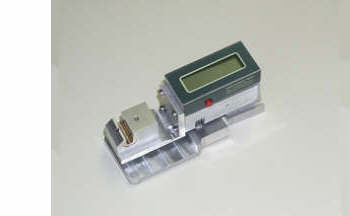
       Measurement and displaying part intended to be combined with a measure taking device ( a clip or any other device produced by the customer ). This body is the base for 06091-A and 07010-A models. The front face has  four holes M3 set in square at distance of 20 mm and four holes 3mm H7 set in cross at distance of 20mm.
     </div>
     <br style="clear:both;"/>
    ]]>
   </content>
   <link rel="alternate" href="http://www.measure-control.com/protractor-04096-A_a5.html" />
  </entry>
  <entry>
   <title>=> protractor 06091</title>
   <updated>2009-11-08T10:33:00+01:00</updated>
   <id>http://www.measure-control.com/protractor-06091_a6.html</id>
   <category term="=>protractor type 06091-A" />
   <photo:imgsrc>http://www.measure-control.com/photo/art/imagette/1226648-1597623.jpg</photo:imgsrc>
   <published>2009-02-16T21:44:00+01:00</published>
   <author><name>J D'hoedt</name></author>
   <content type="html">
    <![CDATA[
     <div style="position:relative; float:right; padding-left: 1ex;">
      <img src="http://www.measure-control.com/photo/art/default/1226648-1597623.jpg" alt="=> protractor 06091" title="=> protractor 06091" />
     </div>
     <div>
      <b><span class="u">Protractor with clip</span></b>       <br />
              <br />
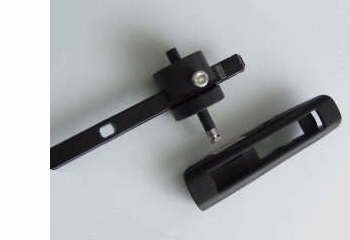
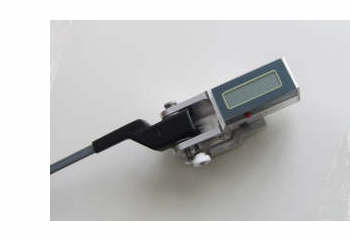
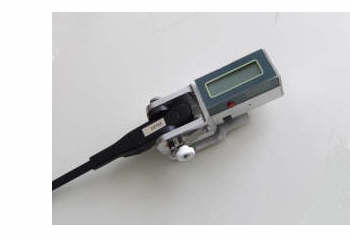
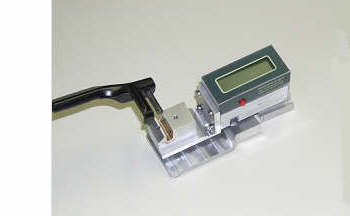
       Formed of the block <span style="font-style:italic"><b>measurement+display</b></span> on which we take up a clip which can receive most of the various types of arm ends. The device 06091-A is supplied with standard adapters which accept most of the arm ends.       <br />
       The photo opposite shows the clip with the standard adapters; the left adapter is maintained against the reference ring; The right adapter is put in the position corresponding at the arm end by means of a knurl. The tightening effort on the extremity of arm is applied through a spring blade what allows the fast change of arm by sliding simply the extremity between both adapters.
     </div>
     <br style="clear:both;"/>
     <div style="position:relative; float:right; padding-left: 1ex;">
      <img src="http://www.measure-control.com/photo/art/default/1226648-1597643.jpg" alt="=> protractor 06091" title="=> protractor 06091" />
     </div>
     <div>
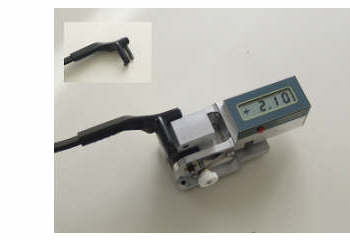
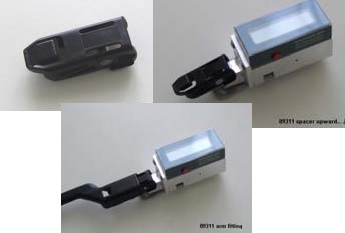
      <b><span class="u">Arm with hooked end</span></b>       <br />
              <br />
              <br />
              <br />
              <br />
       Measure is taken with standard adapters. The clip accepts arm ends until 11 mm width.
     </div>
     <br style="clear:both;"/>
     <div style="position:relative; float:right; padding-left: 1ex;">
      <img src="http://www.measure-control.com/photo/art/default/1226648-1598360.jpg" alt="=> protractor 06091" title="=> protractor 06091" />
     </div>
     <div>
      <b><span class="u">Non hooked arm end</span></b>       <br />
              <br />
              <br />
              <br />
              <br />
       The plastic part covering the arm is separated from the steel arm. On each side the adapters which are mounted in clip. The blocking of the arm is made by the knurl.       <br />
              <br />
       
     </div>
     <br style="clear:both;"/>
     <div style="position:relative; float:right; padding-left: 1ex;">
      <img src="http://www.measure-control.com/photo/art/default/1226648-1598392.jpg" alt="=> protractor 06091" title="=> protractor 06091" />
     </div>
     <div>
      <b><span class="u">Top connexion adapter</span></b>       <br />
              <br />
              <br />
       Adapters intended for this type of arm end are similar to standard adapters but executed in steel  with a restricted thickness.       <br />
       
     </div>
     <br style="clear:both;"/>
     <div style="position:relative; float:right; padding-left: 1ex;">
      <img src="http://www.measure-control.com/photo/art/default/1226648-1598458.jpg" alt="=> protractor 06091" title="=> protractor 06091" />
     </div>
     <div>
      <b><span class="u">Adapters without dismantling</span></b>       <br />
              <br />
              <br />
       These adapters allows to make a measure without having to dismantle the extremity of this type of arm. The shape of adapters takes into account the light roundness of the sides of the arm end.       <br />
              <br />
              <br />
              <br />
       
     </div>
     <br style="clear:both;"/>
     <div style="position:relative; float:right; padding-left: 1ex;">
      <img src="http://www.measure-control.com/photo/art/default/1226648-1598569.jpg" alt="=> protractor 06091" title="=> protractor 06091" />
     </div>
     <div>
      <b><span class="u">Adapter for aeroblade ( bayonet )</span></b>       <br />
              <br />
       The adapter is a block which is put between both standard adapters. The bayonet is slid in the hole in the top. The module accepts left and right arm end. Note that this type of arm end can also be mounted with the model 07010 - A.       <br />
       
     </div>
     <br style="clear:both;"/>
     <div style="position:relative; float:right; padding-left: 1ex;">
      <img src="http://www.measure-control.com/photo/art/default/1226648-1598598.jpg" alt="=> protractor 06091" title="=> protractor 06091" />
     </div>
     <div>
      <b><span class="u">Gauge for angle control</span></b>       <br />
              <br />
       The angle gauge enables to quickly verify if the indications given by the device are in the range of admitted precision. The calibration piece is mounted on the reference ring with a low pressure and the shaft applied to the different planes of the gauge. The gauge angles are –15°, -7.5°, 0°, +7.5°, +15°. The device must indicate the angle value at +/- admitted error. The gauge can be used to calibrate the device with a precision of  +/- 0.1°
     </div>
     <br style="clear:both;"/>
    ]]>
   </content>
   <link rel="alternate" href="http://www.measure-control.com/protractor-06091_a6.html" />
  </entry>
</feed>